
7 Essential Platforms Agencies Use to Manage and Collaborate with White Label Teams
You’re just minutes from launch when you discover the client-approved headline sitting in email isn’t the one on the page. The designer followed the version in chat, and one tiny disconnect has invited a full round of rework.
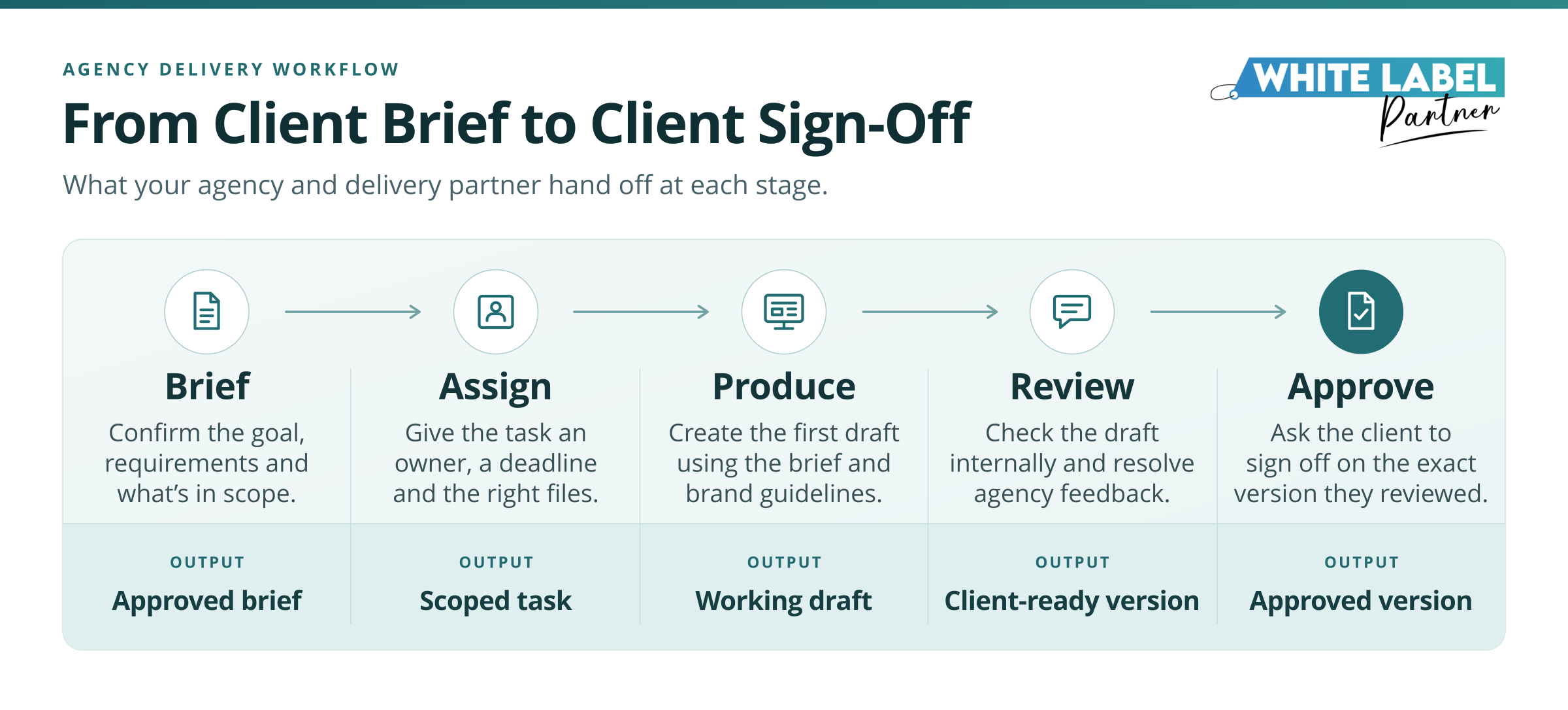
White label project management keeps that kind of chaos from becoming part of your process. It’s how your agency and its behind-the-scenes delivery team coordinate assignments, working files, deadlines, revisions, and approvals while you continue leading the client relationship. With white label services fulfillment, your client sees consistent work under your brand, and everyone involved knows what they own.
Your account manager’s first practical question, then, isn’t which app has the prettiest dashboard. It’s where the approved brief lives and who can act on it. As a landing page and its ad creative move through production, review, and sign-off, seven platforms can give each handoff a dependable home.
Give the Delivery Team One Place to Start
Before your delivery partner can begin, they need three things: a scoped assignment, a clear route for questions, and access to the current files. Each platform below gives one of those essentials a reliable home.
Teamwork.com for Briefs, Owners, and Deadlines
A landing page request becomes useful only when the delivery team can tell exactly what needs to be produced. In Teamwork.com, your intake form can create a task that holds the brief instead of leaving someone to reconstruct it from emails, chat messages, and a suspiciously vague ‘ASAP’.
Set the task up with:
- The specific landing page and accompanying ad creative to produce.
- The due date, dependencies, and person responsible for delivery.
- The agency contact who answers questions and owns final approval.
- The current brand guide, copy, source files, and approved claims.
- A clear definition of done, including mobile checks, working links, and the correct approved headline.
Among project management tools for agencies, Teamwork.com is useful because its forms can route responses into a chosen task list. That gives the request a destination before production begins.
PMI’s 2026 research likewise identifies early alignment on scope, success, and accountability as a practice associated with better project performance. Your partner can then start with fewer guesses, while your account manager knows exactly what will come back for review.
Slack Connect for Questions That Could Stall the Work
Production rarely stalls because nobody is working. More often, someone is waiting for an answer: the landing page needs a disclaimer the brief doesn’t include, or the product images won’t arrive before design begins.
A Slack Connect channel gives the partner a place to flag the issue. Tag the account manager, state what’s missing, explain what it affects, and name the decision needed. The account manager can confirm the client’s response, agree on a substitute asset, or move the deadline after checking availability.
A Practical Rule:
when a chat changes scope, timing, a deliverable, or approval status, copy the decision into the project task while it’s still fresh. Slack can carry the conversation, but the task should hold the outcome.
Otherwise, today’s neat little answer becomes next Tuesday’s “Who approved this?”
A clear communication plan should name who answers routine questions, who handles approvals, and when an issue needs escalation. Quick exchanges stay useful without becoming miniature emergencies.
Google Workspace for Source Files and Live Briefs
Once the question is settled, the team still needs the right file. Three similarly named attachments and a hopeful guess won’t inspire much confidence.
Set the workspace up in three steps:
- Create the client’s shared drive and give the project a clear folder structure.
- Separate files by purpose. Keep the current brand guide and approved claims in Reference, the live copy draft in Working, and reviewed final assets in Delivery.
- Link the relevant files from the project task so the partner can open what they need without searching mid-assignment.
Google Workspace shared drives are useful for continuity because the files belong to the team instead of one individual. If a copywriter, designer, or account manager leaves, their departure doesn’t take the project history with them. Your agency can retain the brief, comments, approved language, and source assets in one place.
Run This Access Check:
Open the project as an external collaborator and confirm that you can reach the files the partner needs. An organized folder is still a locked door if the person doing the work can’t open it.
Control What Goes to the Partner and What Goes to the Client
Shared work doesn’t mean sharing everything. Good white label project management calls for deliberate choices at three points: granting access, handing over useful context, and deciding which version is polished enough to reach the client.
1Password for Credentials the Partner Needs to Use
Whenever a platform permits it, create a named account for each contributor and assign only the permissions their work requires. One universal login passed around in chat may be convenient, but so is leaving the front door open.
If a credential must be shared, a project-specific vault in 1Password can keep the guest’s access limited to the items needed for that assignment. Don’t add client passwords to a general team vault simply because it already exists. NIST’s small-business cybersecurity guidance likewise recommends limiting access to the information and systems people need for their roles.
What to Check When the Work Ends
Make secure access and offboarding part of the project closeout:
- Remove the partner’s accounts, guest access, and vault permissions.
- Confirm your agency retains all files and required recovery information.
- Rotate any credentials that were shared during the engagement.
Loom for Walkthroughs Across Time Zones
A screenshot can show what looks wrong. A short walkthrough can explain why it matters and what needs to change without scheduling another meeting across three calendars.
For a white label custom web development project, the account manager might record the staging page on a phone-sized screen, point out where the call-to-action slips below the product image, and explain how that affects the intended journey. They can then add the Loom link to the project task and write the required action, its owner, and the review deadline beneath it.
Loom’s sharing and privacy controls can also help the agency decide who should be able to view the recording. That matters when Microsoft’s workplace analysis found that 30% of meetings spanned time zones. The delivery team gets the context when their day begins minus a 6 a.m. calendar invitation nobody wanted.
Filestage for Feedback and Final Approval
A creative file shouldn’t arrive at the client while the agency is still debating the font size. Filestage is one platform agencies can use to separate internal review from client approval and keep each decision attached to the correct version.
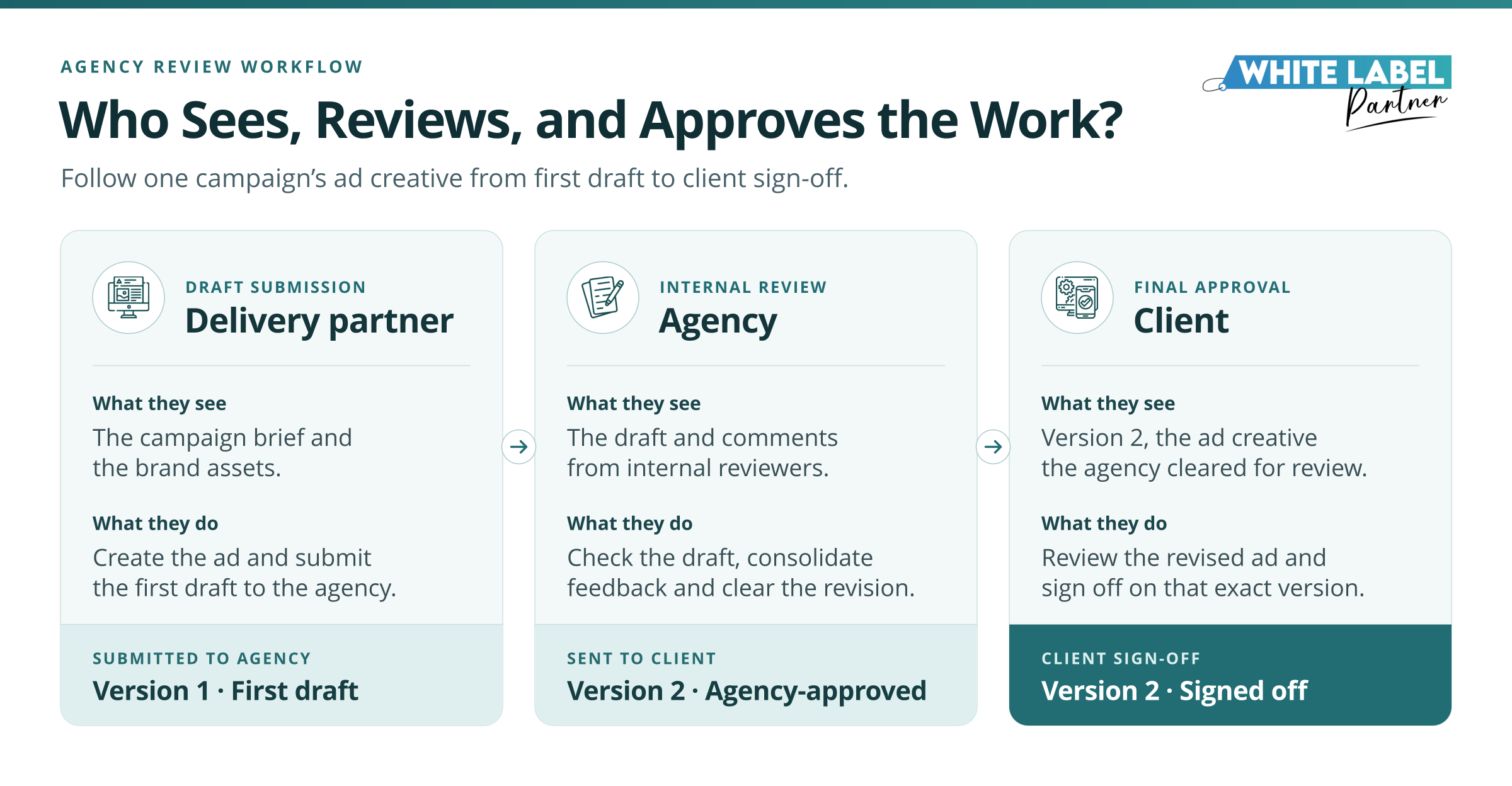
The process can move through three clear rounds:
Agency review: The account manager and internal reviewer comment on Version 1 of the ad creative before it reaches the client.
Client review: The revised Version 2 goes to the named final approver, such as the client’s marketing director with a clear decision deadline.
Delivery update: The account manager consolidates the client’s comments, resolves conflicting requests, and sends one agreed set of changes back to the delivery team.
Filestage lets teams request review decisions, helping distinguish a comment from an actual sign-off. ‘Looks good!’ in a message thread is charming, but it shouldn’t leave three people wondering whether the file is approved.
White Label Partner assigns a dedicated project manager to coordinate delivery between your agency and its fulfillment team. That person can follow up on missing feedback, confirm which version is under review, and make sure the client-approved changes return to production without acquiring a few creative interpretations along the way.
Build a Client Report Your Account Manager Can Explain
Once the campaign is live, attention shifts from approvals to results. Your delivery partner can prepare the figures, but your account manager still needs enough context to explain what changed, why it matters, and what should happen next.
AgencyAnalytics for Reporting Under Your Agency’s Brand
AgencyAnalytics can bring campaign data into a report carrying your agency’s branding. Its reporting features support customized sections, commentary, and scheduled delivery, but automation shouldn’t turn the final review into a ceremonial glance.
Before the report reaches the client, the delivery partner can prepare the numbers and add context. Your agency should then confirm:
- The reporting period covers the intended dates.
- Each conversion has a consistent definition.
- The commentary reflects what the data actually shows.
- Recommended actions make sense for the client’s goals.
Suppose conversions fall immediately after a tracking change. Someone should test the tracking setup before the account manager announces a performance problem. A broken event doesn’t become a marketing crisis merely because the graph looks dramatic.
What to Automate Before the Report Goes Out
The sensible approach is to let software handle repeatable work, such as pulling recurring data and assembling standard report sections. Keep interpretation, quality checks, and client recommendations with people using white label collaboration tools who understand the account.
For agencies already working in that ecosystem, white label GoHighLevel integration services can help connect recurring workflows and reduce manual handoffs. Used carefully, automated white-label reporting gives your team more time to explain the story behind the figures instead of spending Friday afternoon moving them between tabs.
Test Your Setup With One Live Project
You don’t need to rebuild your entire tech stack because one handoff went sideways. Start smaller: take a live client project and follow it through the tools your agency and delivery partner already use.
As the project moves from briefing to reporting, watch what happens at three revealing moments:
- The partner asks, “Which brief should we follow?” If nobody can point to one current version and its next owner, tighten the intake process before buying another tool.
- The client says, “I already approved this.” If the account manager can’t trace that approval to a specific file, a structured review and version history may be worth adding.
- The engagement ends, but access doesn’t. If files are still sitting with former contributors or guest accounts remain active, the agency needs a firmer closeout checklist.
These small tests reveal where your white label project management setup is genuinely breaking down. Some gaps call for better software, but others need a named owner, a clearer rule, or one person remembering to close the digital door on the way out.
Also read: How Many SEO Clients Can One Specialist Manage?
See the Handoff in Motion
When you choose the right white label partner, ask them to walk you through a sample handoff. You should be able to see how they receive a brief, raise questions, submit work, handle revisions, and confirm approval.
A contained pilot makes that easier to assess. Start with one of the white label agency services, one defined deliverable, and one approval owner. You’ll learn far more from watching a real project move than from admiring a perfectly tidy workflow diagram.
Which Handoff Is Putting Your Client Delivery at Risk?
Bring us one client project and show us where delivery tends to stall briefing, production, or approvals. We’ll look at what reaches the team, who owns each decision, and what the next handoff requires.
During an initial call, we can discuss the scope, current workflow, and whether the first improvement belongs in the process, tool setup, or delivery arrangement. See how our partnership process works at White Label Partner, or call +1 980-390-2338 to start the conversation.
Frequently Asked Questions